 X Article Markdown Paste
Vol. 1 · Chrome Extension · X Articles
Markdown to X Articles, in one paste.
A Chrome extension that converts Markdown to X Articles: Obsidian notes, Notion exports, local .md files, and AI-written drafts. Images, tables, code blocks, covers, and tweet embeds import automatically, and you review everything inside X before publishing.
Rendered Draft
Launch Notes
Title, cover, images, tables and embeds arrive in the editor ready for review.
Features Desk
What Markdown to X Articles converts
The point is not just pasting. It is reducing publishing risk around X editor changes, local images, tables, and cover handling.
Auto-uploads images
External URLs are fetched + uploaded via X's own media pipeline. Local images work with directory access.
Title & cover auto-detected
First H1 becomes the article title, first image becomes the cover. Override explicitly via frontmatter title: / cover:.
Tables → images
X doesn't support tables? We render to PNG and embed inline at HiDPI quality.
Code blocks
Fenced code with language tag → X native code block (mono, gray bg).
Tweet embeds
Tweet URLs are auto-converted to embed cards, just like pasting them on x.com.
Drag & drop .md
Drag a .md file onto the browser — extension creates a fresh draft and fills it in.
Privacy principle: the extension has no analytics, reads no cookies, and sends no article content anywhere. Everything happens in your browser. (This website uses Google Analytics for visit statistics; see the privacy policy.)
Workflow Note
An X Article formatter that works from Markdown
Most X Article formatters are web pages: you paste Markdown in, copy rich text out, then add the images yourself. This extension works inside the X editor instead. Press Ctrl+V on x.com/compose/articles, or drop a .md file on the page, and your Markdown turns into a Twitter article draft: headings folded to X's two levels, native code blocks, tables as images or native tables, tweet links as embeds, and every image uploaded through X's own media pipeline. Nothing goes out until you click Publish. New to Articles? Start with how to post an article on X.
Pricing
Free to use. Pro is a monthly or yearly subscription
Every install starts with a 14-day full Pro trial, no sign-up or card needed. When it ends you drop back to the free tier; articles you already imported are not affected.
- Unlimited images, tables, tweet embeds
- Local image directory support
- Title, cover, and frontmatter auto-detection
- Compatibility maintenance when X changes the editor
- No footer watermark
- Card / Apple Pay / Google Pay
Lifetime early-bird licenses bought earlier stay valid and are not affected.
Reader Questions
FAQ
How do I install and use it?
.md file onto the browser to create a fresh draft.
Does X Articles support Markdown?
, tables collapse into pipes, and code blocks lose their formatting. This extension converts Markdown to X Articles' native format on paste: images upload through X's own media pipeline, tables render as images, and code blocks keep their monospace style.
Does it leak my X account or content?
x.com/compose/articles/*, doesn't read your cookies or password, and uploads zero article content. See Privacy Policy.
Where do I find the license key after purchase?
Creem sends an order confirmation email (subject roughly Your X Article Markdown Paste order) to the address you entered at checkout. Click the "View Order" link inside the email to open your order page on Creem:
- ① Orders panel on the left: click the "X Article Markdown Paste — Pro" row
- ② License Key panel on the right: copy the
5VLZ0-…-…-…-…key
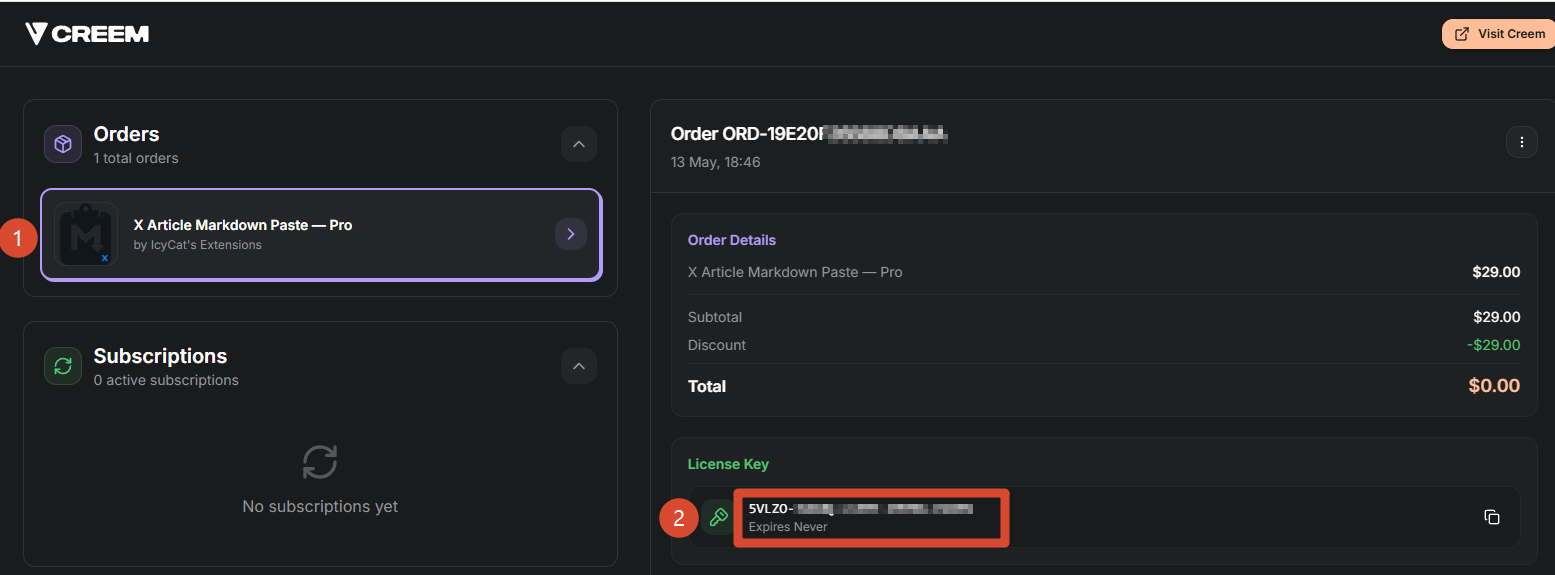
Once you have the key, click the extension icon in Chrome's toolbar, paste it into the License Key field, press Enter. Each key activates on up to 5 devices.